
Two traders build the exact same strategy. Same rules, same stocks, same backtest period. One makes money, the other loses. What happened?
One of them had a different execution timing — that is, when the strategy is evaluated and executed. It’s the part of strategy building that most beginners skip as “some detail in the settings.” And yet it decides what price you actually get and whether your backtest results will hold up live.
In this article I’ll explain two closely related things: triggers (when the strategy fires) and shifting (which bar it looks at while doing so). We’ll walk one concrete example through every variant, so you see exactly what changes — and where the most dangerous mistake in systematic trading hides.
What a trigger is — and why entry and exit are separate
A trigger is the moment when the strategy “wakes up,” checks its conditions, and based on them potentially sends an order to the broker. On a daily chart the strategy runs twice a day — once for entry, once for exit.
- Entry trigger — when the conditions for opening a position are evaluated and the entry order is sent.
- Exit trigger — when the conditions for closing a position are evaluated.
These are two independent settings. You can enter at one moment and exit at another. One important detail: the exit trigger is evaluated before the entry trigger. Prices and indicator values at the moment of exit can therefore differ from those a moment later at entry.
The three trigger types: when exactly the strategy fires
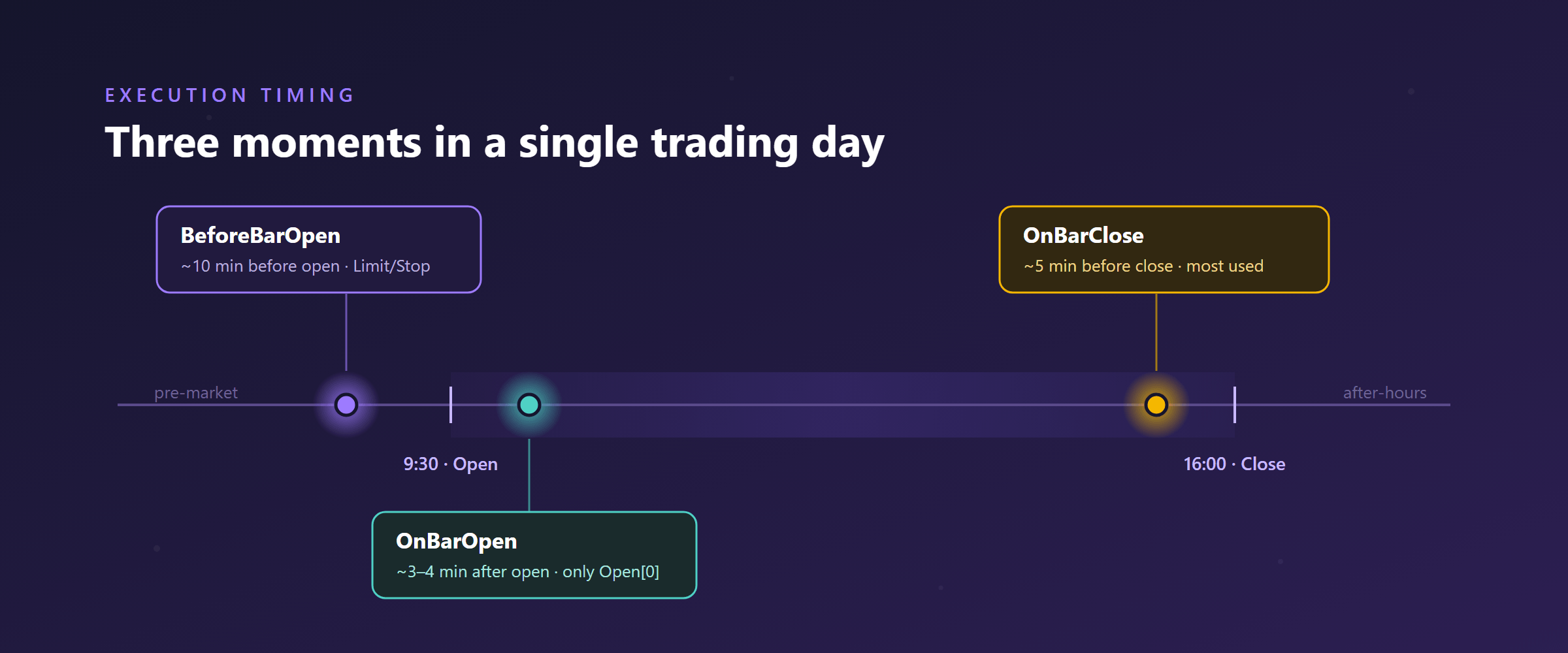
AlgoCloud’s execution timing offers three moments during the trading day. They differ in what data is available at that moment and how the order is executed.
| Trigger | When | What it’s for |
|---|---|---|
| BeforeBarOpen | ~10 min before the market opens | Placing pending Limit / Stop orders before the open |
| OnBarOpen | ~3–4 min after the market opens | Entering at the day’s opening price (rotational strategies, entry after a closed weekly bar) |
| OnBarClose | ~5 min before the market closes | Most common choice; entry/exit near the closing price |
The moment you pick determines not only when you trade — but also which bar your rules see. And that’s exactly where shifting comes in.
What shifting is — and why everything rests on it
Shift is the number in square brackets after a price or an indicator. It says how far back the value should be read:
[0]= the last (current) bar[1]= the previous bar[2]= the bar before that, and so on
A higher number = further into the past. Close[1] therefore means “the closing price of the previous bar.”
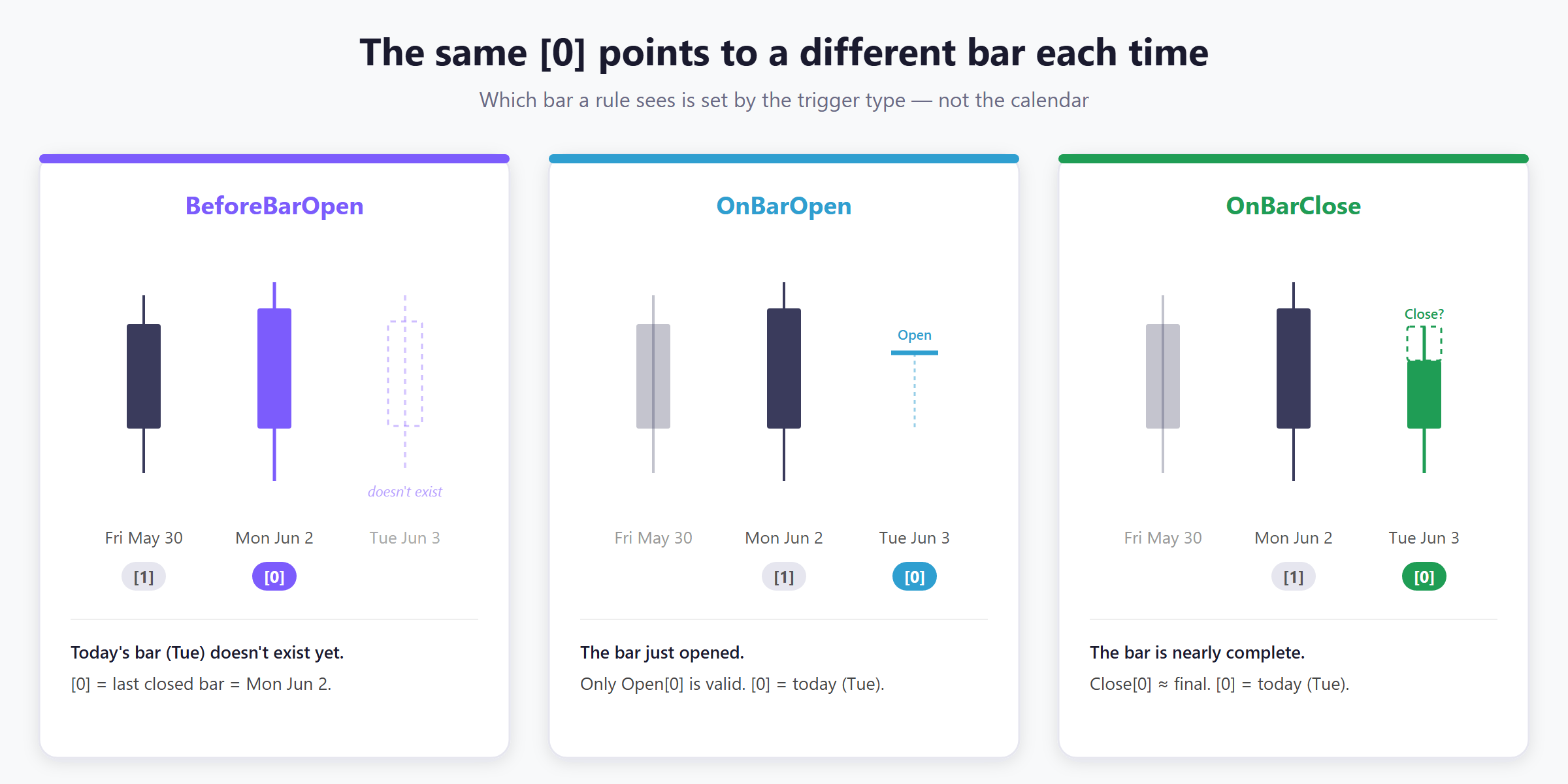
shift = 0 does not automatically mean “today’s bar.” It means “the last value visible at the moment the trigger fires.” And which bar that is depends on the trigger type — not on the calendar.Why is that? Because before the market opens, today’s bar doesn’t exist yet. Five minutes before the close it exists, but it isn’t finished. The same [0] notation therefore points to something different each time. Let’s see it on actual numbers.
One example, three outcomes
Let’s say it’s Tuesday, June 3 and the strategy is deciding whether to buy. We’ll use a simple rule and watch what [0] and [1] map to under each trigger.
BeforeBarOpen — everything from closed bars
It’s Tuesday morning, still before the open. Today’s bar (June 3) doesn’t exist. So the “last visible bar” is yesterday.
Close[0]= yesterday’s closing price (Jun 2)Open[0]= yesterday’s opening price (Jun 2)SMA(50)[0]= the indicator computed from yesterday’s closed CloseClose[1]= the closing price from Friday, May 30 — note that the shift skips the weekend, because it counts trading bars, not calendar days
Everything is from closed data, so it’s safe. I use this trigger when I want to place a Limit or Stop order before the open. Careful: if you paired it with a Market order, the position would open right at the day’s opening price — and you’d pay any overnight gap.
OnBarOpen — today’s Open exists, the rest doesn’t
It’s Tuesday a few minutes after the open. The new bar (June 3) has just started forming — only the opening price is finalized.
Open[0]= today’s opening price (Jun 3) — fineOpen[1]= yesterday’s opening price (Jun 2)Close[0]= wrong — we’re at the start of the day, today’s Close doesn’t exist yet. This is looking into the future.Close[1]= yesterday’s closing price (Jun 2) — fineSMA(50)[0]= wrong — in the backtest it’s computed from the end of June 3 (looking into the future); live it’s computed from the current price after the open. Two completely different values.SMA(50)[1]= the indicator from yesterday’s closed Close — fine
Just like Close[0], the same goes for High[0] and Low[0]: today’s bar isn’t finished, so those are future values. With OnBarOpen, the only thing you may read at shift 0 is Open[0].
Open[0]: even the opening price isn’t always available. For large caps (roughly 95% of S&P 500 stocks) AlgoCloud knows the day’s Open, so Open[0] works. For smaller names (mid/small caps), the opening price isn’t reliably available — and when the system doesn’t know it, it falls back to the previous bar’s Close (Close[1]) instead. So with mid/small caps, don’t rely on Open[0] under OnBarOpen.OnBarClose — today’s bar almost complete
It’s Tuesday five minutes before the close. Today’s bar is nearly finished.
Close[0]= today’s closing price (Jun 3) — this is no longer looking into the future, the live Close will just be slightly different from the backtest (the BT can use the exact 16:00 Close, live it’s a 15:55 snapshot)Open[0]= today’s opening price (Jun 3)Close[1]= yesterday’s closed Close (Jun 2)SMA(50)[0]= the indicator from the current price on Jun 3 — may differ from the backtestSMA(50)[1]= the indicator from yesterday’s closed Close (Jun 2) — identical in BT and live
This is the trigger I use most often. I’ve found there’s less slippage than at the open — and when there is some, it usually works in my favor.
Same rule, different validity
Now the most important part: one and the same condition is perfectly fine under one trigger and a mistake under another. Let’s take five concrete expressions and run them through all three triggers.
| Condition | BeforeBarOpen | OnBarOpen | OnBarClose |
|---|---|---|---|
Close[0] > Open[0] |
✓ valid | ✗ lookahead | ✓ valid |
Open[0] > Close[1] |
✓ valid | ✓ valid | ✓ valid |
High[0] > SMA(50)[0] |
✓ valid | ✗ lookahead | ✓ valid* |
Close[1] > SMA(50)[1] |
✓ valid | ✓ valid | ✓ valid |
SMA(50)[0] > SMA(50)[1] |
✓ valid | ✗ (use [1]>[2]) | ✓ valid* |
* Under OnBarClose the conditions are valid, but values at shift 0 (Close[0], High[0], Low[0], SMA(50)[0]) may differ slightly live versus the backtest.
Notice the pattern: under BeforeBarOpen everything passes, because at that moment all bars are closed. Under OnBarOpen, every condition that reaches at shift 0 for anything other than Open fails.
Lookahead bias: the mistake that destroys a backtest
Lookahead bias is a situation where the strategy, when making a decision, relies on data that didn’t actually exist yet at that moment. In a backtest it looks beautiful — after all, the engine knows the whole day in advance. Live, that value simply isn’t there at the moment of the decision.
The result: a beautiful equity curve in the test that falls apart live. The two most common ways to sneak it into a strategy:
- OnBarOpen +
Close[0]: in the backtest it maps to today’s Open, live it’s a quote a few minutes after the open — two different things, and on top of that you’re relying on an unfinished bar. - An indicator at
shift 0under OnBarOpen: in the backtest it’s computed from the day’s closing price, which nobody knows at 9:34.
That’s why with indicators I generally prefer the value from a closed bar — see the next section.
Practical execution timing rules I actually use
Trigger by order type
- BeforeBarOpen → only Limit / Stop (not Market — otherwise you pay the gap).
- OnBarOpen → entry at the day’s Open; good for rotational strategies (enter Monday’s Open, exit Friday’s Close) or entry after a closed weekly bar.
- OnBarClose → my default choice, the least slippage (partly because the spread is tightest near the close — more in my colleague Michal Zaremba’s study on trading costs).
Indicators: closed price vs. current value
There’s no universal rule here — it depends on what you want to find out:
Close[0] > SMA(200)[1]is better thanClose[0] > SMA(200)[0]. An SMA from a closed bar won’t differ live from the backtest. I keep Close at[0]because I want the current price. With a period of 200, the difference of one bar barely changes anything.- Conversely,
RSI(2)[0] < 20is better thanRSI(2)[1] < 20. I want the current RSI value so I can potentially enter today — yesterday’sRSI(2)[1]is already stale today. But if I wanted to enter at OnBarOpen at today’sOpen[0], then it has to beRSI(2)[1](today’s RSI doesn’t exist yet in the morning).
Short period + a need for freshness → rather [0] under OnBarClose. Long period or a morning entry → [1] from a closed bar. You build all of these rules by clicking in the strategy builder, with no coding.
Frequently asked questions
Which is better, OnBarOpen or OnBarClose?
For most daily strategies, OnBarClose — there’s usually less slippage and more data is closed at the moment of the decision. OnBarOpen makes sense when you deliberately want to trade the day’s opening price (typically rotational strategies or entry after a closed weekly bar).
Why does my backtest match but live trading doesn’t?
The most common cause is lookahead bias — a rule at shift 0 reaches for an unfinished bar (classically Close[0] or an indicator at shift 0 under OnBarOpen). The backtest knows the whole day in advance, the live market doesn’t. Rewrite indicators to the value from a closed bar ([1]) and the problem usually disappears.
Can I have entry and exit on different triggers?
Yes, they’re independent settings. Just remember that the exit is evaluated before the entry, so prices and indicators can have different values at the moment of exit than a moment later at entry.
What does [1] on an indicator mean?
That the indicator is computed from the last closed bar, not from the one currently forming. This value is identical in the backtest and live — which is why [1] is the safe choice for indicators whenever you don’t strictly need today’s value.
Why can’t I use a Market order with BeforeBarOpen?
The strategy evaluates conditions 10 minutes before the open based on yesterday’s closed data. A Market order would then fill right at the day’s opening price — and you’d pay the entire overnight gap. That’s why this trigger is used with Limit or Stop orders at a specific price level.
Conclusion: execution timing is part of the strategy, not a detail
Triggers and shifting aren’t a setting you “just leave alone.” They’re the rules for what reality the strategy sees and when it acts. The same logic built on the wrong trigger is a different strategy — and often a worse one, because its backtest lies.
If you remember a single thing, let it be this: shift = 0 means “the last visible value at the moment of the trigger,” not “today.” Everything else follows from that. And always ask, for every condition, whether that value actually existed at that moment.
If you’re just starting out with systematic trading and this feels like a lot of detail at once, don’t worry — in practice you’ll get the hang of it within your first few strategies. You can start with the guide to building a stock-picking algorithm without coding and the official documentation on execution timing.
Want to try triggers and shifting on your own strategy?
Libor Štěpán
AlgoCloud trader
Related Articles
- How to Build a Stock Picking Algorithm Without Coding – Build and backtest your first no-code strategy step by step
- A Simple Breakout Strategy: Detailed Analysis – A practical strategy built from the ground up
- 7 Best Algorithmic Trading Platforms for Stock Picking – Compare the top platforms