
Today we will follow up on the previous article, where we created the first portfolio of selected strategies. This time, we will focus on portfolio money management — how to effectively allocate capital between individual strategies. Getting portfolio money management right is one of the most important steps before going live.
Why Portfolio Money Management Matters
Let’s say that we have, for example, 10,000 USD in shares intended for trading. Our portfolio contains 6 strategies with minimal correlation.
So how do you allocate capital between these strategies to maximize portfolio performance with minimal drawdown? This is exactly what portfolio money management is about.
We used Portfolio Master in the previous article, which is part of the StrategyQuant program, where we simulated the optimal composition of the portfolio from source strategies based on genetics. By this we said: “WHAT” we will trade.
Portfolio Composer: The Key Tool for Portfolio Money Management
Today we have to ask ourselves another important question: “HOW” we will trade that.
Some strategies will trade more often, others may trade with a higher percentage of success, etc. We will use Portfolio Composer, which is also part of StrategyQuant as of version 141. It should also be part of AlgoCloud in the future.
In this module, you can simulate different options for setting the percentage of capital allocated to individual strategies, as well as setting the total capital and possible leverage. And we can do this either manually or automatically.
Manual Weight Adjustment for Portfolio Money Management
First we need to load strategies into the module in the Portfolio composition tab.
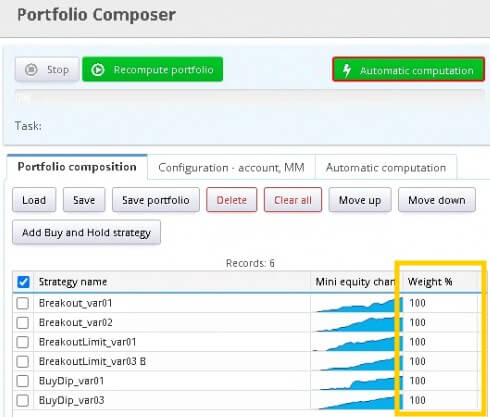
You see a column next to each strategy called Weight%, where for each strategy we set how much money we allocate to it from the total capital — i.e. we give it some weight. The more weight, the more capital it will have.
Weight = 100% — the strategy trades with the original money management (in our case 10% of the account)
Weight = 200% — the strategy trades with twice the original money management (i.e. 20%)
Weight = 50% — the strategy trades with half of the original money management (i.e. 5%)
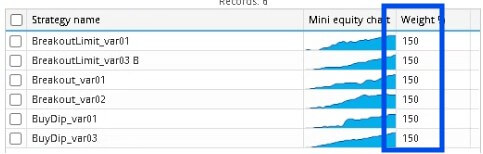
If we wanted to assign an equal share of the total capital to each strategy, we set the weight of each strategy to 150. This means each strategy will have 15% of the account available, and we keep the remaining 10% as a free reserve.
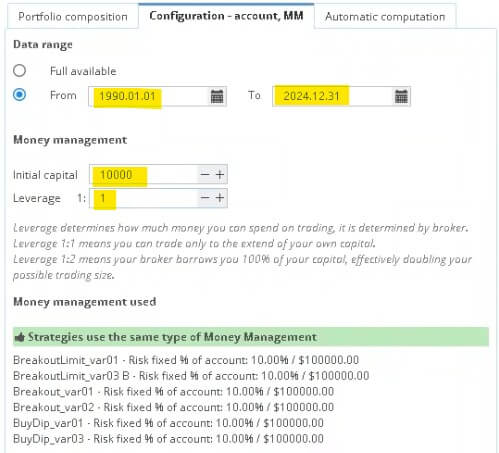
In the tab Configuration – account, MM we set:
- Period from 1.1.1990 – 31.12.2024
- Initial capital of 10,000 USD
- Leverage to 1:1 (max. 1:2)
I would generally recommend leaving the leverage at 1:1, maximum at 1:2. Alpaca also offers a 1:4 leverage option, but that’s for advanced traders.
Then click the button Recalculate portfolio and after a while we will see the results on the right side.
In the tab Overview you can see the overall statistics. With this portfolio money management setup, we would earn a little over 86 thousand USD in total with a maximum %DD of 3.81%. Profit factor 1.45, Ret/DD 16.52, success rate almost 60% and average annual return 2.5%. It’s a decent base for such a small portfolio.

Now let’s try entering the leverage 1:2. You can see how much of a difference it makes. The profit is 10x greater with a DrawDown of 15% and an annual return of 25%. This is the power of leverage. Warning: never adjust a larger leverage!

In the other tabs you can see a list of all trades, an Equity curve and a log file where individual trades are detailed.
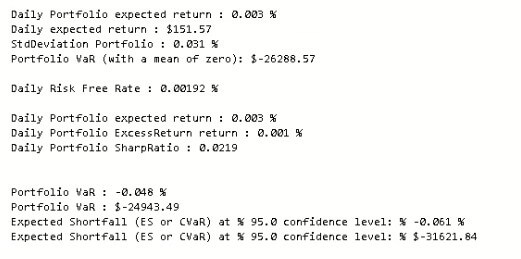
Of course, you can experiment and try giving different weights to individual strategies and see how the portfolio’s performance changes.
Automatic Weight Optimization with Markowitz Efficient Frontier
If we have a few strategy units in the portfolio, you can try assigning weights manually. However, if there are more strategies, this approach could be very time consuming.
Fortunately, for these cases, Portfolio Composer offers an automatic calculation of weights based on the Markowitz Efficient Frontier model. This model maximizes return for a given level of risk — a cornerstone of modern portfolio money management.
How to Run Automatic Portfolio Money Management Optimization
- In the tab Automatic Computation select the model Markowitz Efficient Frontier
- Choose as the fitness measure Sharpe ratio
- Set up 1000 simulations (according to PC performance) and Risk-Free Rate to 0.7
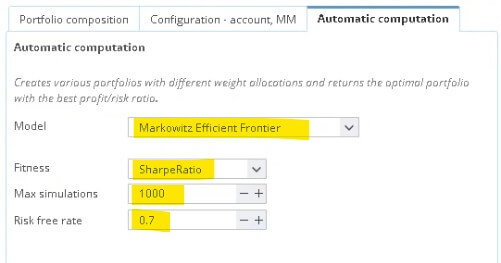
Then click the green button Automatic computation.
After generating 1000 simulations, a new tab is created showing individual simulations (blue dots). Next, we see a portfolio with minimal risk (green dot) and the optimal portfolio (yellow dot). Optimal weights are loaded into the Portfolio composition tab.
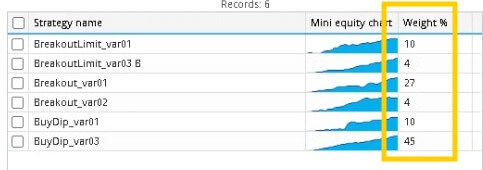
Since 100% means our original risk, which is 10% of the account, we need to rewrite the table so that the percentage setting is correct. Just multiply the newly obtained weights by the number 10.
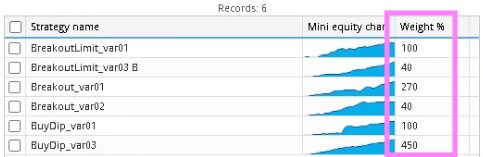
Results: Automatic vs Manual Portfolio Money Management
At a 1:1 leverage setting we get these results. With the optimal setting of the weights according to the Markowitz algorithm, we have an annual yield almost twice that of the manual assignment. That’s a significant improvement in portfolio money management.

With optimal weights and a 1:2 leverage, a huge difference can be seen. In particular, look at the average trade, which is almost 2.5 times larger than when manually setting the weights.

What’s Next After Setting Up Portfolio Money Management?
With this, we have set up portfolio money management for individual strategies and the entire portfolio. Of course, there can be thousands of combinations of optimal weights — all you have to do is experiment.
Try to calculate the optimal weights yourself, both manually and with the help of the Markowitz algorithm. I personally like the results, and I believe that this module will help you save a lot of time and nerves.
So we have completed the overall setup of the portfolio, and next time we will finally deploy this portfolio on a test account.
Good luck building your first portfolio!
Libor Štěpán
Libor’s Complete AlgoCloud Series
- How Much Money Do You Really Need to Start Real Trading?
- How AlgoCloud Helped Me with Profitable Trading
- A Simple Breakout Strategy: Detailed Analysis
- Breakout Limit Strategy: Detailed Study
- Russell 1000 Index: Buying Dips Strategy
- One Year with AlgoCloud & 50% Profit
- Building the First Portfolio
- Deploying Strategies on a Demo Account